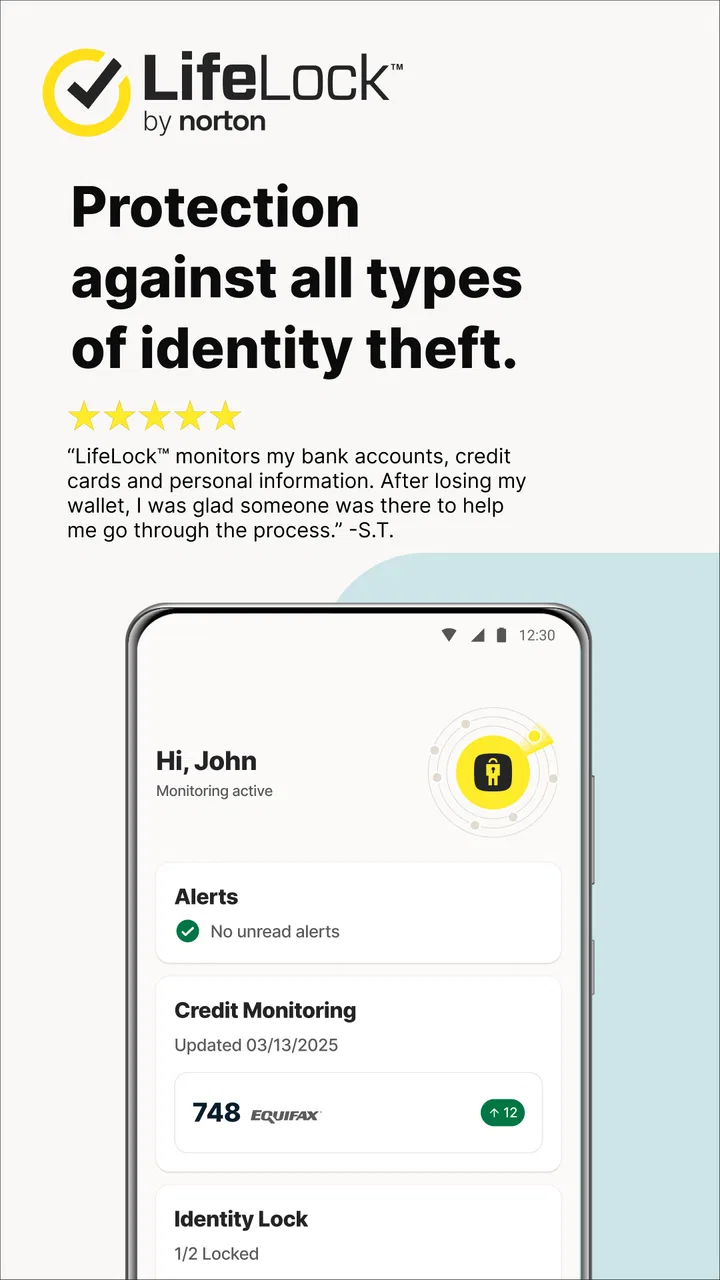
LifeLock Identity by Norton
- 4.3
- Rating
- 5.00M
- Installs
- Free
- Price

 Analysis by App-foxy
If you are looking for a mobile way to keep an eye on identity-related warnings, LifeLock Identity by Norton is designed to put that task in one place. I found its strongest appeal in the simple idea behind it: instead of waiting until a suspicious event becomes a major problem, you can use the app to review fraud alerts, notifications, and related account activity while you are away from a computer. It is a free finance app from NortonMobile, rated for Everyone, and it runs on devices using Android 10 or later.
That description sounds straightforward, but an identity-protection app is not something I judge by how attractive its opening screen looks. The real test is whether it helps me understand what needs attention, what an alert actually means, and what I should do next. In that respect, this app is most useful as a monitoring companion rather than a replacement for careful account habits, bank alerts, credit checks, or direct communication with a financial institution.
My main advice is to treat LifeLock Identity as an early-warning dashboard, not as a guarantee that every form of fraud will be prevented. That distinction matters. The app can help bring identity concerns into view, but I would still use unique passwords, enable security controls wherever available, and contact the relevant company directly when an alert involves money or personal information.
You May Also Like

 AccuWeather: Weather Radar
AccuWeather Review: A Quick, Clear Forecast for Everyday Decisions
For everyday plans, the best forecast is the one you can understand quickly. AccuWeather makes rain timing, radar, and local conditions easy to act on, with a few trade-offs.

 Hill Climb Racing
Why Hill Climb Racing Still Turns Crashes Into One More Run
A tiny car, a bumpy hill and one more upgrade: Hill Climb Racing keeps resurfacing because its simple chaos makes every near-miss feel personal.

 AliExpress - Shopping App
AliExpress Makes Global Shopping Feel Personal, but Shoppers Bear the Risk
AliExpress turns a global marketplace into a pocket-sized discovery engine. Its reach is useful, its shopping loop compelling, and its trade-offs easy to miss.

 Lords Mobile: Kingdom Wars
Lords Mobile Is a Kingdom-Building Routine, Not a Quick Match
A case-by-case verdict on the building, battles, device demands, and social commitments that make Lords Mobile rewarding for some players and exhausting for others.

 PDF Scanner app - TapScanner
TapScanner Makes Paperwork Easier to Capture, Check, and Share
TapScanner makes scanning with a phone feel less like a rescue operation and more like a dependable step in getting work done. Its capture tools are useful, though not flawless.

 Block Blast!
 Shows How Much a Puzzle Game Can Leave Out
A quiet grid game shows why puzzle players increasingly value instant clarity, repeatable skill and low-pressure play—and where the genre still needs to catch up.
More From Our News Desk
View All News


What to expect from the mobile experience
The app focuses on identity protection on the go. In practical terms, that means the experience centers on alerts and notifications rather than budgeting, investing, bill payment, or everyday banking. If you expected a full personal-finance manager, you may find the scope narrower than expected. If your priority is keeping an eye on possible identity issues from a phone, that narrower focus makes more sense.
LifeLock Identity has been available since November 26, 2018, and the current version is 3.1. Its presence is not limited to a small group of early adopters: it has passed five million installs, with an average rating of 4.4 from roughly forty-two thousand ratings and around twelve thousand written reviews. Those figures suggest that many people find the concept useful, although popularity alone does not tell me whether the app fits a particular person’s needs.
The developer shown for the app is NortonMobile. The download itself is free, which makes it easy to try without committing money at the installation stage. There are in-app purchases ranging from $9.99 to $349.99 per item, so I would pay close attention to any plan or upgrade screen before accepting it. “Free” here should be understood as free to install and begin exploring, not as proof that every protection service connected with the app is included without charge.
That pricing structure is one of the first points I would explain to a friend. The app can be worthwhile for someone who only wants to review the available mobile experience, but a person seeking a broader identity-protection service should compare the cost and coverage of any offered option with what they already receive through a bank, insurer, employer, or credit-monitoring service.
Who will get the most from it
I see the best fit in people who want a central place for identity-related notifications and who regularly handle important accounts from a phone. It can also suit someone who travels often and does not want to depend on a desktop browser to notice a warning. The mobile format is particularly practical when a notification arrives during a commute, while shopping, or between appointments and I need to decide whether it deserves immediate attention.
It is less suitable for someone searching for a detailed spending tracker, a credit-score workspace, or a complete password manager. It is also not the right choice for a person who expects an app to investigate every suspicious message automatically or resolve a disputed transaction without their involvement. Those tasks still require judgment and, often, direct contact with the bank, merchant, carrier, or government service involved.
Compared with ordinary bank notifications, the app’s value is its identity-protection focus. Bank alerts are excellent for transactions on one account, but they may not give me a single place to think about broader fraud warnings. Compared with a browser-based identity service, the phone app is more convenient for notifications and quick checks. The trade-off is that a small screen can make complex information harder to interpret, so I would use a larger screen or an official website when I need to read extensive account details or complete a complicated recovery process.
Starting carefully after installation
My recommended first step is not to rush through every screen. Install the app, open it, and read each explanation around alerts, notifications, and account access before continuing. Identity services deal with sensitive information, so I would confirm that I am using the official application associated with NortonMobile and that I understand which account I am signing into. I would also avoid completing setup on an unsecured public connection if I can wait until I am on a trusted network.
During setup, use an email address and password combination that you can protect properly, and do not recycle a password from a shopping, social, or banking account. If the app presents security choices, I would enable the strongest option I can use consistently. The important habit is not merely finishing registration; it is making sure the account that protects your identity is not itself easy to access.
Once inside, take a slow tour of the main areas. Look for the place where alerts are displayed, the area for notifications, and any screen that explains account status or recommended actions. I would not assume that an empty screen means everything in my life is risk-free. It may simply mean that there is nothing currently requiring attention in the app, or that the service needs additional setup before it can show useful information.
Another practical step is to decide how you will respond to notifications. A warning is only useful if you can recognize it and act on it. Keep app notifications enabled if you want timely prompts, but do not blindly trust every message that appears to come from a security service. Open the app directly rather than tapping an unexpected link in a message, especially when the notification pressures you to provide a password, payment detail, or identity document.
The first meaningful success
For a first-time user, the first successful action is not simply signing in. It is opening the alert area, understanding what the app is showing, and knowing where to go if something looks unfamiliar. I would start by reviewing each visible notification from the oldest item to the newest rather than tapping only the most alarming-looking title. Read the surrounding context, note the date or account reference shown, and separate information from an instruction to act.
If an alert relates to an account or service I recognize, I would verify it through that organization’s official app or website. I would not use a phone number or web address supplied in a suspicious message. If the activity is unfamiliar, I would take a screenshot or write down the relevant details, then contact the organization using a trusted channel. This workflow is more reliable than trying to solve everything inside the identity app.
A useful routine is to check the app at a fixed time each week, even when no notification has appeared. I prefer this to opening it only after a frightening message arrives. A calm review makes it easier to notice changes, update contact details if needed, and remember which warnings have already been handled. It also prevents the app from becoming a source of anxiety that I consult repeatedly without taking a clear action.
One non-obvious benefit of this approach is that it creates a personal incident trail. When I record what an alert said, when I checked it, and which organization I contacted, I am less likely to repeat the same investigation later. That record can also help if a bank or service provider asks when I first noticed a problem. The app may surface the concern, but my own notes make the response more organized.
Where new users can become confused
The biggest point of confusion is the difference between an alert and proof of fraud. An alert is a reason to investigate, not a final verdict. Legitimate activity can look unfamiliar because a company uses a different billing name, a family member made the purchase, or an account was accessed from a new location. I would avoid changing every password in a panic before identifying which account or event the notice concerns.
The opposite mistake is just as risky: dismissing a warning because the amount is small or because the message appears only once. Fraudsters may test whether an account is active with a minor event before attempting something larger. I would verify the source independently and keep a note of the result, even when the first check turns out to be harmless.
Another source of friction is the boundary between the app and the company connected to the alert. LifeLock Identity can help me notice and organize identity-related information, but it is not the merchant, bank, email provider, or government office that controls every underlying account. If I need to freeze a card, dispute a charge, restore access, or change a phone number, I may still have to use that organization’s official support route.
Notifications can also be misunderstood. Turning them off may reduce interruptions, but it can defeat the reason for installing a mobile monitoring tool. On the other hand, leaving every alert enabled without reviewing the settings can create noise. I would keep important security notifications active and adjust less urgent prompts only after I understand what each category means.
The purchase screens deserve careful attention too. Since the app is free to install but includes paid items, I would read the description of any subscription or upgrade, check the billing terms shown on the screen, and confirm the purchase only when I know what service I am selecting. This is especially important for a family member who may assume that installing the app automatically includes every protection feature.
Everyday use in a realistic situation
Imagine receiving a notification while waiting at an airport. It refers to an identity-related event that you do not immediately recognize, and you have only a few minutes before boarding. I would open LifeLock Identity directly, read the alert, and avoid responding through the original notification. If the event appears connected to a card or account, I would use the bank’s official app to check recent activity. If the bank confirms something is wrong, I would lock or replace the card through the bank’s own process and then keep the identity alert as part of my record.
If the bank shows no matching activity, I would not conclude that the warning is meaningless. I would check whether the alert refers to another account, an application, or a change in personal information rather than a purchase. If I still cannot identify it, I would wait until I have enough time to contact the relevant organization safely. The app helps me begin the investigation, but it does not turn a rushed airport moment into a complete fraud-resolution process.
This scenario shows why the mobile format matters. A browser-only service might provide similar information, but opening a phone app during a busy day is easier. At the same time, the smaller interface encourages quick decisions, and quick decisions are not always wise when identity information is involved. My preferred balance is to use the app for discovery and triage, then move to the official account channel for confirmation and action.
Practical habits that make the app more useful
First, keep your contact information current wherever the service allows it. A warning sent to an old email address or unused phone number is not much help. Second, review notifications after major changes such as opening an account, changing an address, or replacing a phone. Those are moments when legitimate activity can generate confusion, but they are also moments when an unauthorized change deserves quick attention.
Third, do not use the app as your only line of defense. Keep direct alerts from your bank and card providers active, because those services are closest to the transactions they monitor. I would also review important account recovery methods and remove old phone numbers or email addresses from accounts I no longer use. This layered approach is stronger than expecting one app to see every possible warning.
Fourth, be selective about what you share during support or verification. If a message asks for a full password, a one-time code, or an unusual payment, stop and verify the request through an independently opened official channel. An identity-protection app can make me more alert, but that alertness has to carry over into my behavior outside the app.
Finally, decide in advance what counts as urgent. An unfamiliar bank transaction, a password-reset request I did not initiate, or a change to an account’s contact details would receive immediate attention. A duplicate notification or a familiar merchant name with a slightly different description can wait for a careful check. This simple priority system keeps the app useful without turning every notification into an emergency.
Performance, access, and value
The Everyone age rating makes the app approachable for a broad audience, although younger users may still need an adult to explain alerts and paid options. The minimum operating-system requirement is Android 10, so owners of older Android phones should check compatibility before planning around it. I appreciate that the basic download does not force a purchase immediately, because it lets me see whether the layout and notification style suit my routine.
The rating of 4.4 is encouraging, but I would interpret it alongside the app’s purpose. People often judge identity tools differently: some want a quiet notification center, while others expect a complete service with extensive assistance. Before paying for anything, I would identify the exact problem I am trying to solve and compare that with the feature description presented in the app.
For someone who already receives strong identity monitoring through a bank or an employer, adding another service may create overlapping alerts rather than meaningful extra protection. In that case, the better option may be to improve the existing service’s notification settings and learn its response process. For someone with no organized way to review identity warnings on a phone, this app can provide a clearer starting point.
My recommendation for the next step
After the first successful review, I would not simply leave the app installed and forget it. I would schedule a short weekly check, confirm that notifications are working, and learn which organization to contact for the types of warnings most relevant to me. I would also revisit any paid option only after comparing its scope and cost with alternatives already available through my financial accounts.
LifeLock Identity by Norton is a sensible choice for a first-time user who wants a mobile identity-protection companion and is willing to investigate alerts carefully. Its strengths are convenience, a focused purpose, and a straightforward path from notification to verification. Its limitations are equally important: it is not a full banking app, not a substitute for every account provider, and not a reason to trust an unexpected message automatically.
I would recommend trying the free installation, completing setup slowly, and judging the app by whether it helps you take one clear, safe action when a warning appears. If that focused workflow matches your needs, it can earn a place in your regular security routine. If you want detailed financial management or a single service that handles every fraud dispute for you, I would look elsewhere or combine this kind of monitoring with the specialized tools provided by your bank and other trusted accounts.
FAQs for LifeLock Identity by Norton
01What is LifeLock Identity by Norton and how does it work?
LifeLock Identity by Norton is a comprehensive identity theft protection service that monitors your personal information for potential threats. It works by scanning a wide range of data sources, alerting you to suspicious activity, and providing tools to help recover your identity if it's compromised. The app offers credit monitoring, dark web surveillance, and alerts for any changes to your financial accounts.
02How secure is my personal information with LifeLock?
LifeLock employs advanced encryption and security protocols to ensure the safety of your personal data. The app is designed to monitor your information without compromising your privacy. With Norton’s cybersecurity expertise, LifeLock offers robust protection against unauthorized access and constantly updates its security measures to counter evolving threats.
03Does LifeLock Identity by Norton offer any guarantees?
Yes, LifeLock offers a Million Dollar Protection Package, which includes compensation for lawyers and experts if needed to help resolve your case. This guarantee underscores their commitment to providing effective identity protection and offers financial reassurance to users in the event of identity theft.
04What devices and operating systems are compatible with LifeLock?
LifeLock Identity by Norton is compatible with both Android and iOS devices. The app is designed to seamlessly integrate with smartphones and tablets, providing a user-friendly experience across different platforms. Regular updates ensure the app remains compatible with the latest operating systems and devices.
05How does LifeLock alert me to potential identity threats?
LifeLock sends alerts via mobile notifications, emails, and even phone calls for high-risk threats. These alerts are designed to be timely and informative, allowing you to take immediate action if necessary. The app provides detailed information about the threat and offers guidance on how to address it effectively.
Pros
- Comprehensive identity theft protection.
- Includes credit monitoring services.
- 24/7 customer support available.
- Dark web monitoring included.
- User-friendly interface design.
Cons
- Subscription can be expensive.
- Some features limited to premium plans.
- Occasional false alerts reported.
- Mobile app lacks some desktop features.
- Identity restoration can be complex.

LifeLock Identity by Norton
Gallery